
Using a YubiKey for passwordless authentication in Linux
I always like how on my Framework 13 laptop I can just touch my fingerprint module instead of putting in my root password whenever I needed to run a sudo command. So I wondered if on my desktop I achieve the same results using my YubiKey 5c. After a quick search I found this post from someone who did exactly that. So here are the steps I did:
- install the pam_u2f module which on Fedora looks like this:
dnf install pam-u2f pamu2fcfg - generate a key for my user
mkdir ~/.config/Yubico
pamu2fcfg -o pam://hostname -i pam://hostname > ~/.config/Yubico/u2f_keys
- edit
/etc/pam.d/sudoand add the following line
auth sufficient pam_u2f.so cue origin=pam://hostname appid=pam://hostname
And that’s it! Now whenever I do a sudo command if the YubiKey is plugged in I get a prompt to touch it and the command is executed.
Linux tools and utilities #1
In this series I want to document tools or programs that I find useful in day to day life and to recommend them to others to try
1. WoeUSB
Let’s say your Windows install is corrupted or for whatever reason you need to create an USB installation media for Windows. Normally you need access to a working Windows to run MediaCreationTool.exe to burn the iso to the USB drive but with WoeUSB you can do this from Linux. It has both a command-line utility and a GUI version included in the install. Available for Arch, Ubuntu or Fedora
2. Heynote
If you find yourself permanently having a txt file open where you paste various commands, logs, passwords, or any random notes, Heynote might be for you. It is a large, persistent text buffer divided into blocks. Creating a new block is as easy as pressing Ctrl-Enter, and pressing Ctrl-A within a block selects the content of just that block. You have syntax highlighting for each individual block if you need, plus various other utils like the included calculator. It is available as an AppImage or Snap, and also available on Mac and Windows.
3. Scrcpy
Scrcpy (pronounced “screen copy”) is an application that mirrors Android devices (video and audio) connected via USB or TCP/IP and allows control using the computer’s keyboard and mouse. It does not require root access or an app installed on the device. It works on Linux, Windows, and macOS. Great if you are at your computer and want to do something more complex on your phone.
Testing NextDNS and first impressions
For the past few years I have been running a Pi-hole instance on my home network because I want to have a modicum of privacy without being tracked and spied on by various adware companies. What I like about it is that it works on all devices on my network without having to setup adblockers on each one of them. The disadvantage of it though is that without setting up a vpn or Tailscale to my home network whenever I am away from it I lose all of that.
And that’s where I found NextDNS while researching some Reddit threads about Pi-hole and Adguard. It works in a very similar way to them by blocking ads at the DNS level. I like that it has support and documentation for all major mobile and desktop OSs, and it supports various DNS methods:
- DNS-over-TLS, it will looks something like
123abcd.dns.nextdns.io - DNS-over-HTTPS, it will looks something like
https://dns.nextdns.io/123abcd - IPv6
- if neither of the above work, you also can set via IPv4, they give you a couple of their DNS servers IPs and you can link your IP in their interface to have an overview of what’s been blocked
You can manually add domains or subdomains to be either whitelisted or blacklisted, if you find that you want to access some blocked sites or want to deny them. And account setup is very easy, you can get a trial config for a week without setting any accounts, they have a quite reasonable free plan and their pro plans are just $1.99 per month. So I think if you don’t want to manage your own Pi-hole or setup adblockers on your mobile devices it is a good alternative and I recommend them so far.
HyperX Cloud Flight battery monitoring on Linux
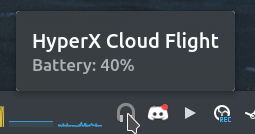
I’ve been using my wireless HyperX headphones for a while on Linux without any issue (just plug and play, insert the USB dongle and turn them on), but one thing has been bothering me: not knowing how much battery I have left. Normally on Windows you can check it via their Ngenuity app but it is not supported on Linux. Luckily someone already made a small tray application just for that. Note that this one only supports the Cloud Flight headset, but there is another one that supports the Cloud II Wireless and Cloud Stinger 2 headsets.
Hello world!
So happy that you are here :)